Why fibre faults are hard to argue with and hard to find
Fibre problems rarely announce themselves politely. A link drops. An SFP refuses to come up. A camera stream stutters. A building-to-building path works in the morning and fails after another trade has been above the ceiling. From the rack, the whole thing gets described as "the fibre is bad." That phrase is almost never specific enough to fix the problem.
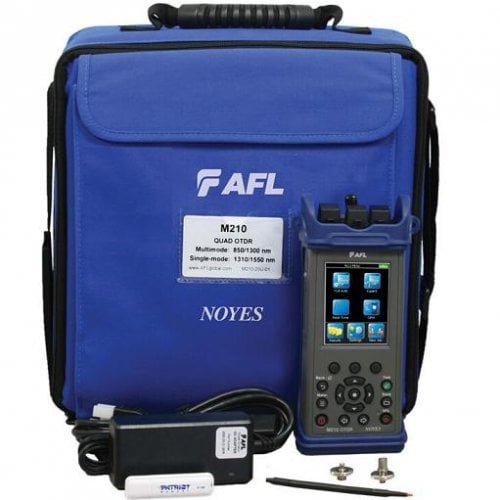
The AFL Noyes M210 OTDR is the tool you rent when you need to see what is happening along the fibre route. It does not just tell you that loss exists. It helps locate where that loss appears, what kind of event caused it and how far along the route the team should look.
That matters because fibre troubleshooting can waste a lot of site time. Without an OTDR trace, teams end up cleaning connectors, swapping patch leads, replacing SFPs, opening cabinets and blaming the last person who touched the route. Sometimes that works. Often it just burns the access window.
What an OTDR does in practical terms
An OTDR sends light pulses down the fibre and reads the reflections that come back. In plain English, it builds a map of the fibre path. The trace shows events such as connectors, splices, bends, breaks and loss points. Instead of guessing where the problem is, the team gets distance and loss information that narrows the search.
That is different from an optical power meter. A power meter is useful for checking total loss from end to end. An OTDR is useful when the total loss is too high and you need to know why. The two tools answer different questions. For fault location and route validation, the OTDR is the one that changes the conversation.
Why the M210 fits UAE site work
The M210 is useful because it can support both singlemode and multimode testing. Many sites are mixed. A campus or venue may use singlemode between buildings and multimode inside a technical room or legacy riser. Renting one compact OTDR that can handle both keeps the kit simple and reduces the chance of arriving with the wrong tool.
The 1310 and 1550 nm wavelengths are especially important for singlemode work because they help expose different behaviour along the route. A bend or connector issue may show up differently depending on wavelength. Having both views gives the engineer a better picture before opening ceilings, handholes or cabinets.
The field size matters too. This is the kind of tool that fits in the workday rather than becoming a separate logistics exercise. For contractors moving between sites in Dubai, Abu Dhabi and wider UAE, that matters more than a spec sheet suggests.
Best rental use cases
Rent the AFL Noyes M210 OTDR when a fibre route has to be validated before active equipment is installed, when a link has failed and the team needs a fault location, or when a consultant wants trace evidence as part of handover.
It is also useful on event and temporary venue builds. Fibre backbones often carry production, CCTV, ticketing, press, control room or broadcast-related traffic. If a route is marginal, the event may not expose the problem until the venue is live. Testing before show day is cheaper than explaining an outage after doors open.
For facilities teams, the OTDR is useful after other trades have worked around fibre routes. A tight bend above a ceiling tile, a crushed patch lead, a disturbed splice tray or a dirty connector can all appear after unrelated work. A trace gives the team evidence instead of suspicion.
What to confirm before booking
Confirm whether the fibre is singlemode, multimode or both. Confirm connector types. Confirm approximate route length. Confirm whether you need trace files for handover or only fault isolation during a service visit. Those details decide which accessories should ship with the unit.
Cleaning tools and launch cables are not optional details. Dirty connectors create false readings. No launch cable means you may miss the first connector event. The OTDR is the core tool, but the testing workflow around it decides whether the trace is useful.
How to avoid wasting the rental window
Start with route information. Cabinet locations, patch panel labels, fibre count, expected distance and known splice points all help the trace make sense. If the site documentation is poor, the OTDR will still help, but someone needs to be ready to map what the trace is showing against the physical path.
Clean before testing. Then test. It sounds obvious, but fibre cleaning is the step most often skipped under time pressure. A dirty connector can mimic a real fault and send the team in the wrong direction.
Save the trace files as you go. If the issue returns later, the trace from the first visit becomes the comparison point. That is how fibre troubleshooting becomes evidence-based instead of memory-based.
Bottom line
Rent the AFL Noyes M210 OTDR when you need to move from "the fibre is bad" to "the fault is here." It is the right tool for route validation, fault location and loss documentation across singlemode and multimode fibre. On a live site, that clarity saves more than the rental cost.